10 Ways to Successfully Communicate with Your Virtual Assistant

communicating, virtual assisting, email, Think back to when you first hired your virtual assistant – you likely started out successfully communicating with each other, right? In the beginning, or the “honeymoon period”, communication with the new virtual assistant (“VA”) was great.  But now things aren’t going so well. And now you are wondering, “Where did things go wrong?”

The most successful client and VA relationships are based on the concept that the VA is partnering with you, the client, to increase and grow your business. The focus is on working together as a team for the best possible outcomes for both of you. The savvy client asks their VA for their input and respects their expertise in the areas where they excel. And often times, a seasoned VA will be able to help their client spot potential missteps coming down the pike based on their experience with other clients.

10 Ways to Successfully Communicate with Your VA:

  1. Ensure communications are clear regarding expectations, duties, tasks and deadlines the VA will be handling for you.
  2. Do your best to respond promptly to emails from the VA and answer all their questions, or indicate a time you can respond back to the VA on a particular item.
  3. Be sure to read the VA’s entire email and email back as appropriate, asking for clarification when needed.
  4. Consolidate questions and responses into as few emails as possible.
  5. Consult with your VA regarding which programs will work best with the systems that you already have in place before purchasing new programs.
  6. Respect the VA’s work hours and their preferred communication channels.
  7. Schedule regular planning sessions and updates on projects to make sure you and your VA are on the same page regarding next steps and priorities.
  8. Keep your VA apprised of your schedule for communication purposes: when you will and won’t be available, will be on vacation, or if you are going to be out of the office for extended periods of time.
  9. Communicate upcoming projects and service needs well in advance, checking with your VA for their availability prior to scheduling a time-intensive project.
  10. Keep in mind that your VA has a preferred communication style and will need clear instructions in order to perform your tasks efficiently.

email communicationWhen you, the client, and the VA have an honest and courteous communication system in place, it benefits your business and the continued positive relationship with your VA.

Are you and your VA experiencing any of these communications issues:

  • Are you experiencing difficulties communicating with your VA?
  • Where did it all go wrong?
  • Are you wondering why the communication with your VA isn’t working?

Over the last few years, I have witnessed and experienced some patterns in communication that lead to frustration for both the client and the VA. These patterns often lead to the both clients and virtual assistants not succeeding.

10 Unsuccessful Ways to Communicate with Your VA:

  1. Responding to VA communications containing urgent questions or demanding info about your projects days later or ignoring the communications altogether.
  2. Missing your scheduled planning sessions and check-ins with your VA.
  3. Giving conflicting, vague or incomplete instructions, logins, or other information, making it difficult for your VA to complete tasks assigned.
  4. Purchasing a program or system, without consulting with the VA prior to purchase, assuming that the VA is familiar with a program and that it will work with programs you already have in place.
  5. Not giving your VA prior notice for large projects coming up and/or setting unrealistic project due dates.
  6. Using bullying, demeaning or shaming verbiage when communicating with your VA.
  7. Requesting multiple tasks be completed in a communication to multiple people and not communicating clearly which person is expected to handle each task.
  8. Assigning your VA a task, then jumping in and trying to perform the task yourself, undoing hours of VA work or breaking complex systems.
  9. When communicating edits that need to be made: not including the location of the item to be edited or clearly giving the VA information on what needs to be changed.
  10. Sending several emails in rapid succession instead of bundling several questions or tasks into a single communication, causing communication chaos and time-consuming tracking down of information spread through several emails.

Keep in mind that the key to harmony in any relationship is clear communication. Like any other relationship, each person plays an important part in making the relationship positive and productive.

“A conversation not grounded in honesty is not real communication.” ~Ismail Royer

Where can communication with your virtual assistant improve?

When you hire a professional virtual assistant and successfully communicate in a positive, clear manner, the partnership will be a win/win for both of you.

For information on communication styles check out my blog post, “What Is Your Communication Style?”

Copyright© 2017 Reduce the Chaos Denver, Colorado. All Rights Reserved. (916)534-2048 

Posted in Business | Tagged , , , , | Leave a comment

Social Media Is Like A Ballet Performance

Ballerinas dancingDo you wonder what goes on behind the scenes of a ballet? Have you considered that Social Media is like a ballet performance?

Recently I went to see the Nutcracker Ballet with my daughter and I was very impressed by the performance, the skill of the dancers, the attention to detail. Most important of all, the organization and dedication that went into putting on each performance. I have a deep appreciation for the effort that goes into putting on any type of performance. I have some insight into the massive amount of organizing and choreography that goes on behind the scenes to give an exceptional performance, this ballet performance was stellar.

After the performance I started thinking about the parallels between a ballet performance and social media management. The level of organization, expertise, dedication and training that goes into social media to keep consistent quality content posted to a business’s social sites is very similar to that of putting on a ballet performance.

Social media management is like a ballet performance in a variety of ways. When I think of the putting on a ballet performance, there are always some key elements that come to mind.

9 key elements of a Ballet Performance:

  1. Plenty of behind the scenes organizing, planning and work is done prior to the performance
  2. Several people are involved in each performance
  3. People are carefully chosen for their skill and expertise
  4. Background and props are chosen to enhance the story
  5. Practicing and adjusting is done to get the key elements just right before going public
  6. Timing is a key element in every performance and carefully planned
  7. The performers play to the audience
  8. Participation by the performers and the audience makes for a better experience
  9. People come back for more when they have a good experience

When I think of the managing social media each week, there are always some things key items that come to mind.

9 key elements of Social Media Management:

  1. Organizing, planning and scheduling is done behind the scenes
  2. The business and the social media manager work together
  3. Social media managers are chosen because of their skills and expertise
  4. Images are chosen with the audience and the brand in mind
  5. Posting and images are adjusted to make the most impact
  6. Timing of posts and tweets is a key element and carefully planned
  7. The posts and tweets are created with the audience in mind
  8. Participation by the business and the audience makes a better experience
  9. An active and interesting social media site keeps people engaged

There are a lot of similarities in the key elements between social media management and a ballet performance. If any of the key elements are missing in either case, the results would be similar.

Can you imagine a ballet where there is no planning or choreography, where every person went onto the stage and did what they felt like doing that day? There would be a lot of twirling and fancy costumes but it wouldn’t make much sense to the audience. A confused and disappointed audience would leave and they would be unlikely to return for another performance.

Now imagine if this was done on social media. Wait! You don’t have to imagine it! I am sure you have watched businesses doing this same thing, posting with no planning and when they felt like it on their social sites. I am sure that you notice when a business puts zero time into planning posts or event promotion. If the business only spends time posting what they “feel like posting” that day or not posting for days/weeks at a time, you will notice this when you visit their sites. How about the business that posts only about THEIR business or they post the same thing every week? The results in all these cases, would be much the same, a confused and disappointed audience.

Social media managers can use the key elements of putting on a ballet performance to help improve their social media strategies.

5 Key Strategies for Social Media Management:

  1. Review the key elements of your social media management.
  2. Find areas that need improvement, then put a plan in place to improve those areas.
  3. Always keep the audience in mind when creating posts and choosing images.
  4. Test and make improvements as you go.
  5. Engage with your audience.

Are some of the key elements and strategies missing from your social media management efforts?

BallerinaEvery aspect of putting on a ballet performance takes time, effort and dedication. Having a consistent and engaging presence on social media takes time, effort and dedication too.

If the social media management is going well for your business, congratulations. However, if you are like many other business owners and the social media aspect of your business needs some improvement, then you have some decisions to make. Not everyone wants to put the time and effort into managing their businesses social media or have the skill sets necessary. Finding people that are skilled to partner with you and your business would be the first step into having an active and engaging social media presence for your business.

Want to find out more about how we partner with you to have a consistent and engaging presence on social media? Check it out here.

Copyright© 2017 Reduce The Chaos, Denver, Colorado. All Rights Reserved.

Posted in Business, Social Media | Tagged , , , | Leave a comment

Keep the Focus on Them, Not You

Keep the focus on themThere are various schools of thought when it comes to doing business, one of them is “Keep the Focus on Them, Not You”. The old, in your face, sales model no longer works. The philosophy behind “Keep the Focus on Them, Not You” is about building relationships first, then making the offer. This approach to doing business has proven much more effective.

Doing business can happen both in person and on line. Knowing that the same social rules apply to both is critical for your business.

Think about this: Would you walk up to someone at a party and say, “Hi, I am Mr. Jones”, then as soon as the other person introduces themselves, launch into a product or service sales pitch? Most people would be appalled if you did.

Have you ever met someone that, as soon as you were introduced, launched into a lengthy dialogue all about them, their goals and dreams, their shortcomings, illnesses, how great they are? I am sure you have and your reaction was probably to get away from that person as quickly as possible, avoiding them as often as possible in the future.

Both of these examples of behavior are no more acceptable to potential clients on social media or in an email than they would be at a holiday party.

The savvy business owner knows that making a connection with a potential client or customer comes first, both on line and in person.

Four Tips for Focusing on Them:

  • Whether on social media or in your emailing efforts, make sure what you are talking about is of value to your clients. Ask yourself if what you are sharing is of value to the client or customer?
  • When sharing about you as an example is great for connection, just make sure it is only part of the whole, otherwise the information becomes “all about you”.
  • When sharing behind the scenes photos or information, keep in mind the viewer is doing business with you.
  • Consider whether sharing this information will give your clients and customers more or less confidence in your ability to serve them?

Some Obvious “It’s all about Me” examples:

  • Message on Facebook from someone, whom you just met, about their essential oils, or beauty product, or other MLM business.
  • Email from a business coach with a video taken in her master bathroom (her favorite place) and a drawing on the mirror for building a business.
  • Email from a business coach showing a picture of all her office clutter while wearing a handkerchief on her head. The whole email was about her getting organized.
  • Every post on a business page is advertising their product or service.

For some people, putting everything out front for their clients and customers to see, works; and for others, it has had far from positive results. Everyone must choose for themselves how much and when to share behind the scenes content.

When you keep the Focus on Them, Not You, there is more opportunity to connect, making friends and gaining clients or customers.

Copyright© 2016 Reduce The Chaos, Denver, Colorado. All Rights Reserved.

Posted in Business | Tagged , , | Leave a comment

5 Signs That Disorganization Is Affecting Your Businesses Bottom Line

Money flying As a business owner, are you seeing these 5 Signs That Disorganization Is Affecting Your Businesses Bottom Line? Did you know there is a direct relationship between your bottom line and your ability to manage your day to day business tasks?

Think about the customer’s experience from their perspective when they do business with you. Then consider the people you do business with and how organized or disorganized their businesses are.

Have you done business with people who:

  • Forget meetings or reschedule meetings at the last minute due to poor time management?
  • Procrastinate until the last minute in order to pull an event together, causing stress for everyone involved?
  • Don’t track invoices and payments?
  • Miss deadlines to provide needed information for tasks?
  • Lose payments or pay late because they don’t have a system for handling payments?

We have all experienced these things that disorganized people and businesses do and been affected by them.

Signs Being Disorganized Is Affecting Your Businesses Bottom Line:

Sign Number 1: Money isn’t flowing into your business steadily

  • You forget to invoice clients when a job is completed.
  • Don’t know how much your clients owe you each month.
  • You often work several hours over client retainers.
  • No follow-up system for clients who owe outstanding balances.

Sign Number 2: Deadlines are frequently missed or pushed back for client tasks

  • Clients are unhappy at your delays and are losing money because of them.
  • No system is in place for tracking client tasks and deadlines.
  • Clients often ask for discounts or refunds because of missed deadlines.
  • You get multiple emails or phone calls per day about missed deadlines.

Sign Number 3: Communications are missed or not answered for days

  • You receive angry phone calls or emails from clients asking why you haven’t responded to their communications.
  • Potential clients tell you they found someone else because they didn’t hear back from you.
  • Current clients tell you they went to someone else because they didn’t hear back from you.
  • Costly mistakes are made because communications from clients weren’t read and implemented.

Sign Number 4: Clients are complaining about your disorganization and not referring people

  • There are very few referrals or none at all from your clients.
  • Negative reviews and comments are made on social media about your business.
  • You are hearing from other people that clients aren’t happy with you or your business.

Sign Number 5: Your business has an unusually high client turnover rate for the industry

  • You are constantly trying to replace clients that have left.
  • It is harder and harder to replace the clients that leave.
  • You do not have a system in place to onboard or maintain your clients.

Now for the good news – if you answered yes to any of these 5 signs then you have taken the first step in changing this – Awareness! Once you are aware of a problem then you can come up with a plan to make positive changes.

The second step is Acceptance: So, how many of the signs listed above are a part of your own business practices and how much money is it costing you each month, each year? Knowing where you are at on any of these signs of disorganization is a key pivoting point for you and your business to improve you’re your financial outlook.

The third step is Action: Not everyone is good with every task and that’s why a smart business owner gets help for those areas they don’t excel in, so they can shine in the areas they do excel. The cost of hiring someone to take care of the details is far less than having unhappy clients, losing clients and the lost revenue from both. Think of the bottom line and what your business needs to thrive.

Copyright© 2017 Reduce The Chaos, Denver, Colorado. All Rights Reserved. (916) 534-2048

Posted in Business | Tagged , , | Leave a comment

Annoying Things Business Owners Do On Social Media

social-influenceAre you on Social Media to promote your business? Then you will want to avoid these annoying things business owners do on social media. Social media is just like any other public place, a business owner is always being watched and people are forming opinions. Consider what your customers and clients dislike in face to face interactions, most of those will hold true on social media.

If you want to increase your following on social media there are some things to avoid. Experienced social media managers avoid these things and advise their clients to not participate in them. They know how damaging these can be to your online business reputation. Once someone stops liking or following you on social media, it is doubtful they will be using your business services.

What is a client or customer worth to you this year? For the next 5 years? What will it cost you when you participate in some of these annoying behaviors on social media? Thinking through what you are sharing or posting before hitting the share button could make a difference in your bottom line.

Recently some people once again posted the Facebook privacy hoax copy/paste item on Facebook. When told that it was a hoax and not true, they told me: “it can’t hurt” or “what does it matter if it’s not true”. That told me a great deal about their personal disregard for the truth and basic understanding about the harm that can be done in spreading false information. If your business has ever been at the receiving end of someone starting and spreading false information, you know how devastating this can be. Would I do business with these people after these responses? The answer is a resounding NO.

There are several things you can do right on social media and one is to be courteous in your responses. Check things out before sharing them to see if they are true. Taking a few extra minutes to do some fact checking might save you from hours of having to undo the damage.

If you find you have accidentally posted something that is not true, apologize and then DELETE the post so it doesn’t spread. Commenting in the stream that it’s a hoax doesn’t work, most people won’t read the comments, only share and spread the hoax further.

When you are posting, liking and commenting on social media, think about whether this action will have a positive or negative impact on your business.

Wondering what some of the annoying things might be? This list of “15 Random Things NOT to Do on Social Media” from Social Media today is a great place to start.

Copyright© 2016 Reduce The Chaos Denver, Colorado. All Rights Reserved. (916) 534-2048

Posted in Business, Social Media | Tagged , | 1 Comment

Social Media as a Bridge – from Your Business to Your Customers

Image of bridge over waterAre you using Social as a bridge to communicate with your customers? Social media is not intended to be a one way communication tool, like the advertisements in a magazine, but more like a two way bridge from your business to your customers. A smart business uses social media to connect with and listen to their clients, or customers.
When a business is only focused on advertising and selling on their social media, the opportunities for that business are decreased and reflected in the customer’s lack of interaction with the business on their social sites. On the other hand, when a business engages in providing things their customers want, asking for their client’s opinions, they get much more engagement. Customers want to be heard and they want their opinions valued.

Businesses that don’t change with the times or listen to their customers end up going out of business as their customer population decreases. Different age groups prefer different methods of communication. Offering a variety of ways to communicate with your business is essential, especially when you want to reach the under thirty-five age groups. For instance, Millennials prefer texting or messaging over using the phone or email. Seniors prefer picking up the phone. Bridging the gaps in your business communication lines can make a difference in customer satisfaction and continuing to attract more customers.

Bridging the gap with social media provides many benefits for the business as well as the clients or customers.

What can businesses gain by using social media as a bridge to their clients?

~ Insights into what the customers or clients really want

~ Quickly spot changes and trends in the marketplace

~ Open communication with the customer for better customer service

~ Quicker response time to customer needs and issues

~ Happy customers or clients will equal increased revenue and referrals

What if your business isn’t on social media?

~ Your customers and clients ARE on social media and may be talking about your business

~ You won’t know what clients and customers are saying about your business

~ You won’t be able to respond on social media to their comments – positive or negative

~ Others with similar businesses are on social media and using it to connect with your current clients and customers

We often tell our clients that being on social media is like going to a very large cocktail party where people are there for a variety of reasons. Savvy business owners know how to leverage opportunities. When businesses remember this and use a more social approach to their offerings they can reach their ideal clients. If you are a business owner and not a social person, hire someone who can and will be able to manage your social sites.

How can your business use social media as a bridge to your customers?

Copyright© 2016 Reduce The Chaos Sacramento, California. All Rights Reserved. (916) 534-2048

Posted in Business, Social Media | Tagged , , , | Leave a comment

DIY Email Newsletters Gone Wrong!

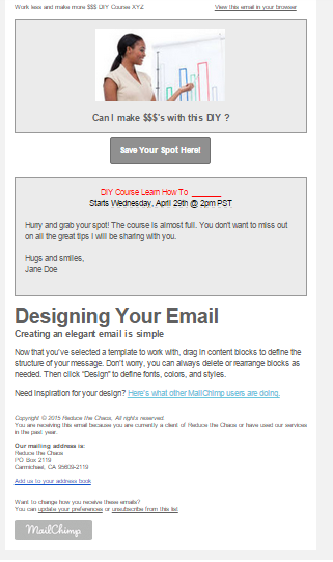
DIY NL gone wrongHave you received emails that were obviously a DIY Email Newsletter Gone Wrong? What did you think when you opened the email? Recently I received a DIY Email Newsletter Gone Wrong. This email was from a business owner that I had not heard from in a while. Out of curiosity, I opened the email and was dismayed by what I saw. To protect the sender I have recreated a similar email using my own email program. The original email had a video in place of the picture, otherwise they are very similar. This is a great example of what not to do when sending an email newsletter. What impression do you think this left on the recipients of such an email?

Have you ever decided to do something yourself so you could save money? Did you think it was going to be easy to do and the project went really wrong? Maybe you decided to repair a leak in the bathroom or to build your own website. Sometimes DIY projects end up costing you more time and money than if you had hired a professional. Plus, DIY when it comes to business, can potentially cause even more damage to the business before the professional is called in.

DIY email newsletters all have a few of these things in common:

  • The business/business owner(s) look unprofessional.
  • They tell the receiver that the company may be having quality control issues.
  • Give the impression that the business owner is having a problem getting/keeping quality assistants.
  • Creates the impression they are trying to do something themselves they are not proficient at doing.
  • Can cause large quantities of unsubscribes from the valuable contact lists.
  • The receiver may also speculate on why the business is not hiring a professional.

Newsletters done by professionals have these things in common:

  • The banner and images are sized to fit and have adequate space between them and the wording.
  • The font and colors match the business or organization branding.
  • The look and feel of the communications are consistent.
  • Social Media Icons are easy to locate.
  • All the links work and go to the correct place.

There are some great email programs out there today that you can use to reach your ideal clients and keep in touch with your contacts. Many of the programs are not user friendly and some are. All of them take a bit of time to learn, since they are all a bit different. These program also make changes on a regular basis. Do you have the time to spend learning the programs and creating your own newsletters? For those who want to let that particular task go, assistance is an email or phone call away.

Lap topGenerally speaking, the time it takes you to do a task you might not be familiar with doing could take you 3 or more hours while hiring someone who is proficient and versed in the task will not only save you time and money, it will save your sanity and headaches down the road.

Copyright© 2015 Reduce the Chaos Sacramento, California. All Rights Reserved. (916)534-2048

Posted in Uncategorized | Tagged , , | Leave a comment

What Are You in The Habit of NOT Doing?

HabitMost of the information written about habits when it comes to business is written about forming positive habits. This leaves an important part of business habits that are rarely talked about. That area is the area of what you are in the habit of NOT doing for your business. That’s right, I did say “habit” in reference to something that you aren’t doing regularly for your business. You probably spend a lot of time talking about what you are doing or going to do for your business, but it is those things that you do NOT do habitually that can make the difference between succeeding or failing both with your business and with life in general.

Being consistent with something is usually thought to be a good thing, but in the case of being consistent with NOT doing something for your business, it can be destructive.

A great example of a habit of NOT doing things for your business is NOT keeping fresh content on your website, blog and social sites.  Every day I come across social sites, blogs, and websites that haven’t had new content added in weeks, months and in some cases it’s been years!

Which leaves me wondering if the business is:

  • Still in operation?
  • Outdated and behind on current trends?
  • Able to handle my requests quickly?
  • Disorganized or inconsistent?
  • So busy they can’t update these items, and if so, will they be too busy to serve my needs?

When it comes to your business, you know you want prospective clients asking positive questions about your business rather than any one of these negative questions when they visit your social sites or websites. If you said “NO” to wanting your potential clients or customers asking these questions, read on…

What is the solution to take care of the things you are NOT in the habit of doing in your business?

  • Determine what you are currently doing for your business, then list what tasks you are NOT currently doing that need to be done.
  • List which items can be delegated to a virtual assistant.
  • Get in the habit of delegating the “NOT” done tasks.

Turn the negative into a positive.  To change what you are in the habit of NOT doing, if you do NOT have time to get the tasks done, then find someone else who can take on those crucial tasks and turn them into Getting Done tasks.

DoneSuccessful people know when and what to delegate, that is how they got from where they were to where they are now. They understand the purpose and value of hiring people to take care of the NOT done list.

The cost of the tasks being done by a virtual assistant are usually far less than the cost to your business when those crucial tasks are left NOT done.

Want to take the “NOT Getting Done” list and turn it into your “Getting Done” List? Find out how at  Reduce the Chaos

Copyright© 2015 Reduce The Chaos Sacramento, California. All Rights Reserved. (916) 534-2048

Posted in Business | Tagged , , , , , | Leave a comment

Serving Email SPAM and Losing Friends

SPAM emailYou have this wonderful product/service/deal that you just know everyone on your contact list is dying to know about! You can’t wait to share it with them! You have a few hundred emails in your email contacts so you write up an email extoling the virtues of this magical product or this incredible program or this once in a lifetime opportunity.

Now you have the perfect email to let them know about “IT”and you start sending the email out to your contacts. You carefully add the names in the “To” field of your email and send out the email in batches of 25 to 30 people. You know if you send too many at a time, your email program will reject the email.

Email iconYou notice people are already emailing you back before you even get through all your contacts! It’s working! So you eagerly open up an email from a friend and it isn’t even close to the response you expected from them. In fact, they are very angry at you and ranting on about something called SPAM! You open more emails and most of them are very similar to the first email you opened, some more polite than others, but all of them saying you are sending SPAM.

You have heard about SPAM, it’s that meat that comes in a can, isn’t it?  But you are pretty sure that isn’t what your contacts are referring to in their emails.  So you look up the term on the internet and discover that there are laws about emailing… Who knew?  Well, most people in business know about the SPAM laws and the fact that you just broke the laws, even if you didn’t know about them, makes you look really unprofessional.
Yes, what you don’t know about SPAM will hurt you socially and professionally. There are several really good articles on what SPAM is, what the laws are, but most important of all is following the email etiquette that is socially acceptable in today’s world.

So, what can happen if you send SPAM emails?  

  • SPAM emailYou can be reported for sending SPAM
  • Your email account can get shut down
  • You can get fined for sending SPAM emails
  • Your professional reputation can be damaged
  • People can block your emails so you can no longer email them
  • You can make a lot of people really angry at you
  • You DO NOT want any of these things to happen to you

Here are just a few things that our over eager spammer did that you could avoid doing:

  1. Email to a large group of contacts using the “To:” field in your email
    1. Never do this, no matter what.
    2. If you need to send to a group of people from your email, then use the “bcc:” feature at the very least, but we highly recommend using an email program like Mailchimp.
    3. It is acceptable to send to a small group of people who all know each other and have each other’s email using the “To:” field IF it is regarding something that this group of people is involved in directly. Never send emails to a group you belong to in this way if you are promoting your products/services/specials, unless that group has given permission to do so.
  2. Assume that everyone wants to know about something, you must get permission first before you put people on an email list.
  3. If you are going to be emailing to several contacts at a time, set up an email system using Mailchimp, Constant Contact, or one of the many other services available.
    1. If you don’t know how or don’t have the time, hire a VA to do it for you. It is cheaper than being fined for sending SPAM or getting your entire email account shut down for SPAM emails.

Newsletter signup greenAfter reading this, you will want to get be in compliance with the SPAM laws. We set up email programs and opt-in boxes on websites so you can be in compliance with the laws. Contact us to find out how.


If you  still have a few questions and want to make sure you are complying with the SPAM laws, please visit these sites for more information on the SPAM Laws:

Federal Trace Commission

SPAM Legislation

List of articles on SPAM and email Etiquette:

15 Tenets of Proper Email Marketing Etiquette 

25 Tips for Perfecting Your E-mail Etiquette

Email Etiquette 101

Copyright© 2014 Reduce The Chaos Sacramento, California. All Rights Reserved. (916) 534-2048

Posted in Business | Tagged , , , , , , , , | Leave a comment

What Is Your Communication Style?

Have you noticed that you think you are communicating well with someone only to have them completely missunderstand what you said? It is obvious that you have your own way of communicating, while those around you may communicate in a completely different fashion. Is this affecting your business?

There are several styles of communication: the Drip Communicator, the Shotgun Communicator, the Crystal Ball Communicator, and the Organized Communicator. When working with your online assistant and/or social media manager your communication style can be an asset or a liability. Communication between client and virtual assistant/social media manager, known as your online assistant, is crucial to a successful, lasting partnership.

Have you used one or more of these communication styles?

Water dropsDrip Communicator:

When an idea pops into your head you send your online assistant an email; then 10 minutes later you remember you want to add a contact to your contact program, so you send another email. Right after you send the email about contacts, you think “oops I forgot to add another contact”, and another email gets sent. A little later, you realize that the first idea needs some changes so off goes another email. What this looks like to your online assistant is email “drips” – constant and annoying – like a dripping faucet. What’s worse is the time needed to handle this constant drip of emails and keep track of where the information is when the online assistant needs to perform the requested tasks. This also causes items to be missed and in the end, will cost more money when you are invoiced by your online assistant.

TargetShotgun Communicator:

This style of communicator relays bits and pieces of a project sprayed out to many people, but no one, except the client, knows all the pieces. It also means that pieces of information may be going to the wrong people, which can delay projects, plus create confusion and chaos. This also happens with reply all emails, which involve more people and more confusion. What this looks like for the online assistant is that key information is in several places and not where it’s needed, causing more delays and miscommunication opportunities.

Crystal BallCrystal Ball Communicator:

(are you reading my mind yet?) This style of communicator just expects their online assistant to know things without having to tell them. These communicators believe they are communicating, but leave out important details on projects. For instance, they tell the online assistant to “send a newsletter” but neglect to say what day or time they want the newsletter to go out. They have conversations about a project with one person, but don’t let the others involved know about the decisions that were made. The crystal ball communicators are often frustrated when their online assistant doesn’t get things done or requests more clarification.

Steps DiagramOrganized Communicator:

This style of communicator tends to gather most, if not all the information for a project into one place, outline the project with bullet points and deadlines. They have all the key materials necessary to complete the task ready to go, then send one email. If there is information pending, then organized communicators indidcate clearly what is pending and followup on anything outstanding. The organized communicator are respected and appreciated by their online assistant.

Clear communication with your online assistant can save you many hours and a lot of headaches! When you communicate clearly with your online assistant it makes the tasks go easier and increases the online assistant’s efficiency. Sending several emails with bits and pieces for a project or expecting your assistant to read your mind and unclear instructions all create chaos.

No matter what communicator type you are you can improve your communication with your online assistant by taking the steps to communicate clearly.

Reduce the chaos today with clear communication!

Copyright© 2014 Reduce The Chaos Sacramento, California. All Rights Reserved. (916) 534-2048

Posted in Business | Tagged , | Leave a comment