Why You Should Never Leave Your Business’s Social Media Accounts Unattended

In today’s digital world, social media is one of the most powerful tools for building and maintaining a brand. Yet, many business owners create social media accounts only to leave them inactive for months—or even years. If your business has a social media account that hasn’t been updated in a long time, you could be harming your brand more than helping it. Here’s why you should never leave a social media account unattended.

1. It Makes Your Business Look Neglected

When potential customers visit your social media pages, they expect to see recent updates, engaging content, and a responsive business. If your last post was from two years ago, it can make your business seem abandoned or outdated. Even if your company is thriving, an inactive social media account may give the impression that you’re no longer in business or that you don’t care about your online presence.

2. You Miss Out on Customer Engagement

Social media is a two-way communication tool. Customers use platforms like Facebook, Instagram, and LinkedIn to ask questions, share experiences, and seek support. If your account is inactive, you may be missing important messages or comments that could turn into potential sales or customer relationships. Ignoring your audience can make them feel unimportant and drive them toward competitors who actively engage online.

3. It Hurts Your Brand Reputation

A stagnant social media account can damage your brand’s credibility. Customers may assume your company is unreliable or out of touch. Worse, if someone posts negative comments or misinformation about your business and you’re not monitoring your account, it can spiral into a PR disaster. Regularly updating your social media accounts helps maintain a strong, trustworthy brand image.

4. You Lose Marketing Opportunities

Social media is one of the most cost-effective ways to market your business. An inactive account means you’re missing valuable opportunities to promote products, share success stories, and build brand awareness. Your competitors who consistently post engaging content are likely gaining the attention of potential customers who could have been yours.

5. Security Risks Increase

Unattended social media accounts are prime targets for hackers. If your account gets compromised and you’re not monitoring it, hackers could post harmful content under your business name. This could damage your reputation and require extensive effort to regain control and restore trust. Regular activity helps ensure your account remains secure.

6. SEO and Online Visibility Decline

Search engines take social media activity into account when ranking websites. If your social media presence is stagnant, you’re losing potential search visibility. Active social media accounts contribute to increased brand exposure, website traffic, and overall online authority, helping your business stay relevant in search results.

What’s the Solution?

If you don’t have the time or resources to consistently post on social media, outsourcing your social media management can be the best solution. A professional social media manager can keep your accounts active, engage with your audience, and ensure your brand maintains a positive online presence without requiring your daily involvement.

Final Thoughts

An unattended social media account does more harm than good. It can create a negative impression, reduce customer engagement, and expose your business to security risks. If you’re struggling to keep up with your social media, consider working with a professional to ensure your accounts remain active and effective. Your brand’s online presence is too important to ignore!


Looking for a reliable social media manager? Reduce the Chaos offers social media management packages to keep your business visible, engaging, and thriving online. Let’s make sure your social media works for you, not against you! Contact us today!

Posted in Business, Social Media | Tagged | Leave a comment

Why Building an Email List is Crucial for Business Success

Why Building an Email List is Crucial for Business Success

In today’s digital age, building an engaged and expansive email list is crucial for the success of any business. Your email list serves as a direct line of communication with your audience, allowing you to nurture relationships, share valuable content, and promote your products or services. As a virtual assistant, my task is to assist you, the business owner, to have an opportunity to grow your email lists and drive business growth. In this blog, we will explore some special offers that business owners can use to entice their audience and boost their email subscriptions.

  1. Free E-Book or Guide: Creating a high-quality, informative e-book or guide on a topic relevant to your business industry is an excellent way to attract potential subscribers. Offer this resource as a free download in exchange for their email address. Ensure that the content is valuable, actionable, and solves a problem or provides valuable insights for your target audience.
  2. Exclusive Content or Insights: Everyone loves feeling like they are part of an exclusive community. Offer your audience exclusive content or insights that they can only access by subscribing to the email list. This could include insider tips, industry secrets, or behind-the-scenes information that will pique their curiosity and encourage them to sign up.
  3. Webinar or Online Workshop: Hosting a webinar or online workshop on a topic of interest to your target audience is an effective way to not only provide value but also capture email addresses. Promote the event and require attendees to register with their email addresses. During the webinar, deliver valuable content and demonstrate your expertise, making participants eager to receive more information from you in the future.
  4. Discounts and Promotions: Everyone loves a good deal! Offer exclusive discounts or promotions to subscribers on your email list. This can be in the form of special coupon codes, limited-time offers, or early access to sales or new products. By providing these exclusive perks, you create a sense of urgency and encourage people to subscribe to take advantage of the savings.
  5. Contest or Giveaway: Engage your audience by hosting a contest or giveaway that requires participants to enter their email addresses to participate. Offer an enticing prize that aligns with your niche or target audience. This not only helps grow the email list but also generates buzz and increases brand visibility through social sharing.
  6. Quizzes or Assessments: Interactive quizzes or assessments are not only fun but also provide valuable insights to your audience. Offer a quiz or assessment that helps participants learn something about themselves or their needs. To access their results, require them to provide their email address. This approach engages your audience and helps you gather valuable data for segmentation and personalization.

Remember, the key to successful email list growth is to provide genuine value to your audience. Tailor your special offers to resonate with their needs, interests, and pain points. By implementing these strategies, you attract and retain subscribers, ultimately driving business growth and success.

Ask how a virtual assistant, can help you build a strong and engaged email list that will serve as a valuable asset in your marketing efforts.

Contact me today and let’s get started!

You can find Reduce the Chaos on Facebook and Instagram

Posted in Business | Tagged | Leave a comment

Boost Your Content Strategy with a Virtual Assistant

Boost Your Conent Strategy with a Virtual Assistant

As a busy entrepreneur, keeping up with content creation, website updates, and social media promotion can feel overwhelming. If you find yourself struggling to stay consistent with your blog and online presence, a Virtual Assistant (VA) can be the game-changer you need! With the right support, your content strategy can be seamless, engaging, and stress-free.

How a VA Can Elevate Your Blog and Social Media Presence

A Virtual Assistant specializing in content creation can help in two key ways:

1. Writing Blogs with AI, Uploading to Your Website, and Promoting on Social Media

Using AI-powered tools, a VA can generate well-researched, engaging blog posts tailored to your audience. But it doesn’t stop there! Your VA will:

  • Refine AI-generated content to align with your brand voice and messaging.
  • Upload the blog to your website, ensuring proper formatting and SEO optimization.
  • Create eye-catching images for the blog and social media promotion.
  • Schedule and share your blog across multiple social platforms to maximize visibility.

This means you get high-quality blog content without the time-consuming hassle of writing, editing, and managing its distribution.

2. Enhancing & Publishing Your Draft Blogs

Already have a draft blog but need help getting it online? A VA can take your draft and:

  • Polish and proofread the content for clarity and readability.
  • Format and publish it on your website with proper tags and categories.
  • Design and add custom images to enhance engagement.
  • Promote the blog on your social media with compelling captions and hashtags.

This approach ensures that your content is professional, visually appealing, and reaching the right audience.

Why Hire a Virtual Assistant for Blog Management?

  • Saves You Time – Focus on your business while your VA handles content creation and promotion.
  • Ensures Consistency – Regular blog posts and social media updates keep your audience engaged.
  • Boosts Online Visibility – SEO-friendly blogs and strategic social sharing help you attract more visitors.
  • Enhances Brand Image – Professionally written and designed content builds credibility.

Let’s Get Your Content Working for You!

If you’re ready to take your blog and social media to the next level without the stress, a Virtual Assistant is the perfect solution. Let’s work together to create and share compelling content that grows your brand!

Contact me today and let’s get started!

You can find Reduce the Chaos on Facebook and Instagram

Posted in Business, Social Media | Leave a comment

Team Communication With a Virtual Assistant

Effective communication is essential for the success of any team. However, in today’s fast-paced world, where remote work is becoming increasingly common, communicating with virtual assistants can be challenging. In this blog, we will discuss the best practices for team communication with virtual assistants and some of the pitfalls of not having clear communication.

Best Practices:

  1. Set clear expectations: Before beginning any project, set clear expectations with your virtual assistant. Discuss your requirements, timelines, and goals. This will ensure that everyone is on the same page from the start.
  2. Use collaboration tools: There are many collaboration tools available, such as Slack, Asana, and Trello, that can help you communicate with your virtual assistant. These tools allow you to share files, assign tasks, and track progress, all in one place.
  3. Provide detailed instructions: When assigning tasks, provide detailed instructions to your virtual assistant. This will help them understand exactly what you need and how to do it. Use visuals, such as screenshots or videos, to demonstrate complex tasks.
  4. Schedule regular check-ins: Schedule regular check-ins with your virtual assistant to discuss progress, provide feedback, and address any issues. This will help you stay on top of your project and ensure that everything is running smoothly.
  5. Be responsive: Communication is a two-way street. Be responsive to your virtual assistant’s messages and queries. This will help build trust and ensure that you are both on the same page.
  6. Be clear on preferred communication methods: Be aware of which communication methods work best for your virtual assistant to keep track of instructions and client assets.

Pitfalls:

  1. Miscommunication: Without clear communication, misunderstandings can occur, leading to mistakes and delays.
  2. Lack of accountability: Without regular check-ins and feedback, it can be challenging to hold your virtual assistant accountable for their work.
  3. Unclear instructions: If instructions are not clear, your virtual assistant may struggle to complete tasks as you intended, leading to frustration and delays.
  4. Poor time management: Without clear expectations and deadlines, your virtual assistant may struggle to manage their time effectively, leading to missed deadlines and delays.
  5. Lack of trust: Without regular communication and feedback, it can be challenging to build trust with your virtual assistant, which can impact the quality of their work.
  6. Inconsistant communication methods: sending instructions by text, email, message apps, and voice mail can be frustrating, lead to missed instructions, missed assets and cause delays in a project.

In conclusion, effective communication is essential when working with virtual assistants. Set clear expectations, use collaboration tools, provide detailed instructions, schedule regular check-ins, and be responsive. By doing so, you can avoid the pitfalls of miscommunication, lack of accountability, unclear instructions, poor time management, and lack of trust, and ensure the success of your project. Contact Reduce the Chaos more information on communicating and virtual assisting

Posted in Business | Tagged , | Leave a comment

Benefits of Having a Monthly Newsletter Created by a Virtual Assistant

Email Marketing Benefits

For many years, newsletters have become an essential marketing tool for businesses of all sizes. A monthly or bi-weekly newsletter can help you stay top of mind with your audience, build brand awareness, and drive traffic to your website. Have you considered the benefits of having a monthly newsletter created by a virtual assistant?

With all the social media sites and activity is a newsletter still a valid marketing tool? Yes, the newsletter list is still a great way to communicate with your contacts and to promote your products and services.

However, creating and distributing a newsletter can be time-consuming and requires a lot of effort. This is where a virtual assistant (VA) can help. In this blog post, we’ll explore the benefits of having a monthly or bi-weekly newsletter and how a virtual assistant can help make it happen.

Email Marketing

Benefits of Having a Monthly or Bi-Weekly Newsletter

  1. Build and Maintain Relationships: A newsletter helps to build and maintain relationships with your audience. By consistently sharing relevant and valuable content, you can keep your audience engaged and informed about your products or services.
  2. Boost Brand Awareness: A newsletter helps to boost brand awareness by keeping your brand top of mind. It is an excellent way to showcase your brand’s personality and values and keep your audience up-to-date with your latest offerings.
  3. Drive Traffic to Your Website: A newsletter can drive traffic to your website by featuring links to your latest blog posts, products or services. This can result in increased website traffic and ultimately, more sales.
  4. Improve Customer Retention: A newsletter can help improve customer retention by keeping your customers informed about your brand’s latest developments, promotions and offers.

How a Virtual Assistant Can Help

  1. Content Creation: A VA can help create compelling and engaging content for your newsletter. They can work with you to brainstorm ideas, research topics, and write content that aligns with your brand’s values and goals.
  2. Newsletter Design: A VA can help design your newsletter, ensuring that it looks professional and visually appealing. They can use their expertise in graphic design to create a template that reflects your brand’s personality and values.
  3. Distribution: A VA can help distribute your newsletter to your audience. They can upload it to your website, send it out via email, and share it on your social media channels.
  4. Analytics and Reporting: A VA can help track the performance of your newsletter and provide you with detailed analytics and reporting. This can help you understand what’s working and what’s not, and make informed decisions about future content.

Conclusion

In conclusion, having a monthly or bi-weekly newsletter can bring numerous benefits to your business, including building and maintaining relationships, boosting brand awareness, driving traffic to your website, and improving customer retention. However, creating and distributing a newsletter can be time-consuming and requires a lot of effort. This is where a virtual assistant can help. A VA can help with content creation, newsletter design, distribution, analytics, and reporting, allowing you to focus on other areas of your business. So, if you’re considering starting a newsletter, or struggling to keep up with your existing one, consider hiring a virtual assistant to help make it happen.

For assistance with your newsletters, contact Susan at Reduce the Chaos today.

Posted in Business, Email Marketing | Leave a comment

Why Partnering With A Virtual Assistant For Social Media Tasks Is Beneficial

In today’s digital world, social media is a crucial aspect of any business. However, managing social media accounts can be a time-consuming task, especially for small business owners who may not have the resources to hire a dedicated social media manager. This is where virtual assistants come in. By handing off routine social media tasks to a virtual assistant, business owners can focus on other important aspects of their business and enjoy the following benefits:

  1. Time-saving: Social media management is a time-consuming task that requires a significant amount of time and effort. By delegating routine social media tasks to a virtual assistant, business owners can save time and focus on other important aspects of their business, such as product development, customer service, and sales.
  2. Increased productivity: Virtual assistants can handle multiple tasks simultaneously, making them highly efficient. By hiring a virtual assistant to manage social media accounts, business owners can increase their productivity and focus on growing their business.
  3. Consistent branding: Consistency is crucial when it comes to branding. A virtual assistant can ensure that all social media posts are consistent with the brand’s messaging and style, which helps build brand recognition and trust.
  4. Content creation: Creating engaging and relevant content for social media can be challenging. Virtual assistants can help create content that resonates with the audience and encourages engagement.
  5. Social media analytics: Analyzing social media analytics is essential to track performance and make informed decisions. Virtual assistants can track social media metrics, such as engagement rates and follower growth, and provide insights to improve social media strategy.
  6. Cost-effective: Hiring a virtual assistant to manage social media accounts is cost-effective compared to hiring a full-time social media manager. Virtual assistants work on an hourly or project basis, making it an affordable option for small businesses.
  7. Scalability: Virtual assistants can quickly adapt to changing business needs, making them an ideal solution for businesses that require scalable services. As the business grows, virtual assistants can take on more tasks and responsibilities.

In conclusion, social media management is crucial for any business, but it can be time-consuming and challenging. By handing off routine social media tasks to a virtual assistant, business owners can save time, increase productivity, ensure consistent branding, create engaging content, track social media metrics, and enjoy cost-effective and scalable services. By doing so, they can focus on growing their business and achieving their goals. Contact Reduce The Chaos for more information on Social Media Management.

Posted in Business, Social Media | Tagged , | Leave a comment

Benefits of Hiring a Virtual Assistant for Social Media Services

Benefits of Hiring a Virtual Assistant for Social Media Services.

The world of business is constantly evolving, and in today’s digital age, having a strong online presence is essential. As a business owner, you may not have the time or expertise to manage your social media accounts and online presence. This is where a virtual assistant can come in handy. In this blog post, we will explore the benefits of hiring a virtual assistant for social media services.

What is a Virtual Assistant?

A virtual assistant is a remote worker who provides administrative, technical, or creative support to clients. They work remotely and are typically self-employed or work for a virtual assistant agency. Virtual assistants can perform a wide range of tasks, from managing emails and scheduling appointments to managing social media accounts and creating content.

Benefits of Hiring a Virtual Assistant for Social Media Services

  1. Increased Productivity

As a business owner, your time is valuable. By hiring a virtual assistant to manage your social media accounts, you can free up your time to focus on other important tasks. Your virtual assistant can create and schedule posts, respond to comments, and engage with your followers, leaving you with more time to focus on growing your business.

  1. Expertise
Benefits of Hiring a Virtual Assistant for Social Media Services

Social media platforms are constantly changing, and it can be challenging to keep up with the latest trends and algorithms. By hiring a virtual assistant who specializes in social media management, you can tap into their expertise and stay ahead of the curve. They can provide valuable insights and help you create a social media strategy that aligns with your business goals.

  1. Consistency

Consistency is key when it comes to social media. Your virtual assistant can ensure that your social media accounts are updated regularly with fresh and engaging content. This can help increase engagement and attract new followers.

  1. Cost-Effective

Hiring a full-time social media manager can be expensive, especially for small businesses. By hiring a virtual assistant, you can get the support you need without the overhead costs of a full-time employee. You can also hire a virtual assistant on a project basis, allowing you to scale up or down as needed.

  1. Flexibility

Virtual assistants are flexible and can work around your schedule. Whether you need support for a few hours a week or on an ongoing basis, your virtual assistant can provide the support you need when you need it.

Conclusion

Hiring a virtual assistant for social media services can be a game-changer for your business. They can help increase productivity, provide expertise, ensure consistency, and offer a cost-effective and flexible solution. If you’re looking to take your social media presence to the next level, consider contacting us today to get started.

Posted in Business, Social Media | Tagged , | Leave a comment

Not All Virtual Assistants Are Created Equal

Not All Virtual Assistants Are Created Equal

Are you in search of the “perfect” virtual assistant for your business? Is there such a thing as a “perfect” virtual assistant? There are thousands of virtual assisting businesses to choose from, but not all of them are created equal. So, what is the best way to go about finding a virtual assistant that is a good match? The best virtual assistant option for your business may take some research on your part to find the right one.

There are many factors to look at when you decide to hire a virtual assistant and we will dig into that in this article.

Have you hired a virtual assistant in the past, only to be disappointed in their performance? You talked to them and it seemed like they would be a great fit, but after a short time, you realized that the virtual assistant wasn’t working out for you, for a variety of reasons.

Did you know that hiring a virtual assistant is much like hiring anyone who provides a professional service for your business? Just like legal firms and lawyers, virtual assistants all offer different levels of expertise and types of services. There are virtual assistants that have integrity, are organized, deliver quality services and then… there are those who don’t.

How can you know if the virtual assistant you choose will work out or not?

There are no guarantees in life, so there are no guarantees on your new virtual assistant, but the good news is… there are some things you can do to make the best choice with your business needs, personality and communication styles in mind.

Before you start hunting, there are some things to take into consideration:

  • What is your budget per month for your virtual assistant’s tasks/services?
  • What price range are you willing to pay for services? (Remember, sometimes cheap doesn’t mean quality, you get what you pay for)
  • What services do you need your virtual assistant/VA team to perform for your business?
  • Do you want a virtual assistant, or do you need a virtual assistant team?
  • What level of experience do you want your virtual assistant/VA team to have?
  • What is your communication style and favorite method of communicating?

What to look for in a virtual assistant

  • Does the virtual assistant/VA team have experience doing the services you want them to perform?
  • References: can they provide references?
  • Ask what type of clients/businesses the VA serves.
  • Do they charge by the hour or by the task, or a combination of both?
  • Do they require prepayment/retainers?
  • What types of payment methods do they accept?
  • Do they have examples of their work that you can review?
  • What are their hours of operation?
  • What is the standard time for responding to requests by the VA?
  • What is their standard turn-around time for requested tasks?

How to Search for a Virtual Assistant:

  • Ask your business contacts for referrals.
  • If you know and trust a virtual assistant that doesn’t offer the service you need, ask them for referrals.
  • Search online via search engines and LinkedIn

Some things to consider:

  • Anyone can promise you that they can perform a service, but can they do it the quickest and best way? Inexperience by a professional can cost you money, time and clients.
  • Paying less per hour to an inexperienced VA might end up costing twice as much as using an experienced VA with experience and a higher per hour rate.
  • Communication is key to tasks being completed on time and to your satisfaction. If in the initial interview, the VA has difficulty understanding you, or you have difficulty understanding the VA, this may not be a good match.
  • Are your requirements and expectations for a virtual assistant realistic?

If you hire a VA and it’s not working out for you after some adjusting and attempts to work with the virtual assistant, and you decide to look for another virtual assistant, please give the virtual assistant a written notice that includes when you will be ending the business relationship. Having a clear explanation of why you are not satisfied and what the issues were for you will help you on your search for a new virtual assistant.

The most important thing to keep in mind is that the VA you hire is a human being and will not be perfect, they are a person who has feelings and a personal life too. The same applies to a VA team, made up of individuals.

Good luck with your search for the best virtual assistant/ virtual team for your business needs.

If you would like a consultation about Reduce the Chaos services – contact us here

Posted in Business | Tagged | Leave a comment

The Opportunities in Life Challenges

Life challenges happen. Some things are just out of our control. When the challenges do happen, we have choices to make. Do we look for the opportunities during the challenges, or do we let fear and anxiety paralyze us?

The choice of how we deal with any of life’s challenges is up to us. If you are a business owner, you know that there are always things you want to get accomplished, but often run out of time to do them. How many things are on your task list for “someday”?

Well, today is that “someday”.

Instead of “reacting” let’s take some positive “action”.

Since you are out of your “normal” routine because of a life challenge, how can you use this time to be productive and move your business forward? What are the opportunities to accomplish something positive during this time?

Here are some suggestions for focusing your time an energy into using the challenges as opportunities:

  1. Make changes in your routine that benefit you and your business
  2. Incorporate some self-care into your time
  3. Reach out and seek a few trusted people to talk to who will be encouraging and supportive
  4. Plan and Implement steps to keep your business alive through the challenges
  5. Make a list of the “pending” and “someday” tasks you could be working on right now

Refocusing your energies when you may be feeling uncertainty, anxiety and fear, isn’t always easy. The choice is up to you.

Not sure what you could be doing with this time?  

We have some suggestions that might trigger some ideas to help you get started.

10 Ideas for things you could be doing for your business:

  1. Update your business website, your blog and your social media
  2. Write blog posts to use when things get back to “normal”
  3. Set up some email newsletters
  4. Create new social media images and marketing promotional posts
  5. Plan out a new product or service to offer
  6. Create a new program or training for clients
  7. Research some ideas for future articles or programs
  8. Learn something new or update skills by watching training videos
  9. De-clutter your business: Organize your office, clean up the files on your computer
  10. Create some new streamlined systems for dealing with routine tasks
  11. Write an eBook or a book
  12. Read business books for growth and inspiration

Focusing your energy on positive steps will make a difference while the challenges are happening around you. When things get better, you will be several steps ahead of those who wasted their opportunities during the challenges.

What are you doing today with your opportunities?

Posted in Business, Time Management | Tagged , | Leave a comment

Tips for Editing Posts and Sharing on Facebook

Are you looking for “how to” tips for editing posts and sharing on Facebook? We have both basic and advanced tips to share with you. Whether you are new to social media or have been on it for a while, there are always things to learn and changes to make navigating social sites more challenging.

Being on social media is similar to learning to drive a car. There is the dashboard, various knobs and dials (for social media that would be symbols and buttons) and learning their purpose and how they function is key to successful navigation.

Learn about:

  • Why you need a business page
  • Privacy Settings and post visibility
  • Using hashtags
  • How to edit a post
  • How to delet a post
  • Scheduling a post on a business page
  • Sharing a post from a page/to a page

All social media platforms have a dashboard, since we will be talking about the Facebook platform today, note that you will always be able to see the blue bar at the top of the platform, which is your dashboard on Facebook, no matter where you are on the platform.

Personal Profile versus a Business Page:

Image 1

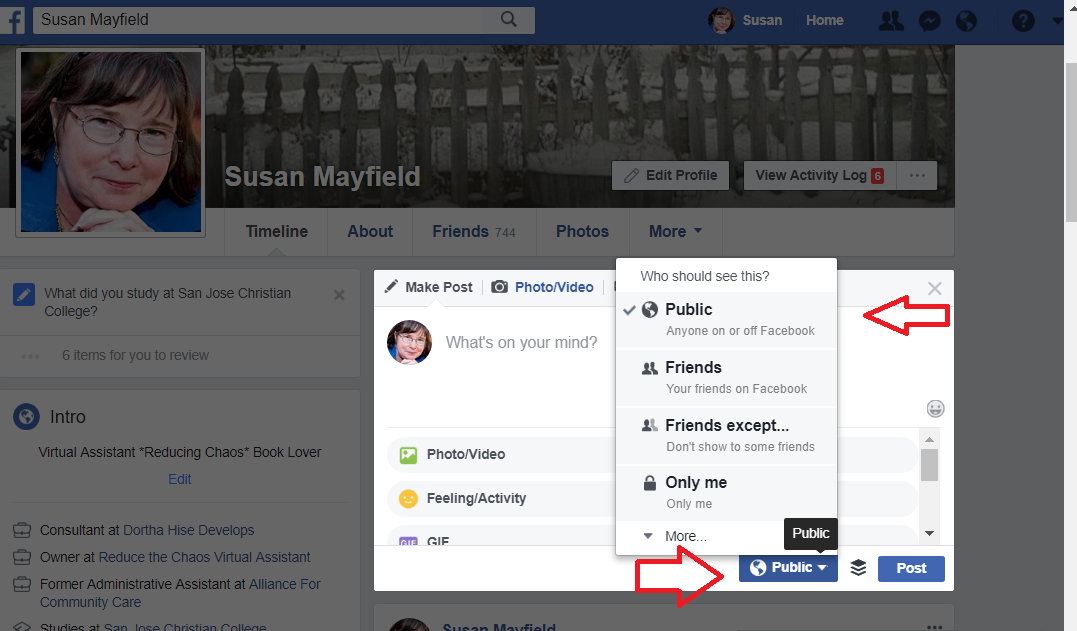
If you are an auther, publisher or blogger you will want to have a Business Page for better visibility and to stay within the terms of use on Facebook. If you use a personal profile your posts are only visible to your friends, depending on the settings of your profile. If you want more than your friends to see a post, be sure that the world symbol is showing under your name.

See Image #1 and note the downward pointing triangle is a drop down menu where you can change the setting. Another drop down menu option for a post is the three dots (elipses) to the right)

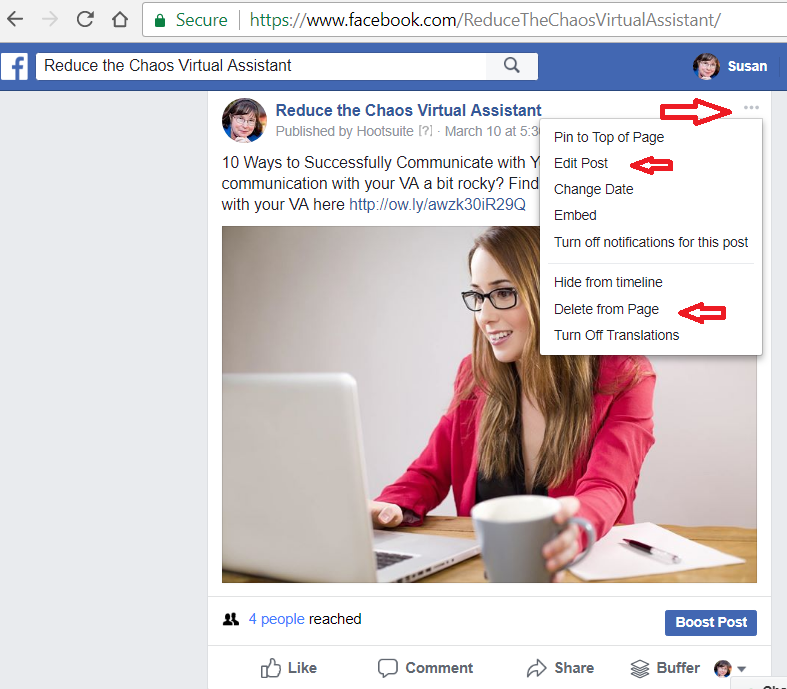
See Image #2 for the menu choices below

Image 2


Note: Facebook can and will delete personal profiles used for business. If you don’t currently have a business page, it’s a good idea to create one and invite your friends to it once you have the information filled out.

Hashtags:

Yes, you can use # hashtags on Facebook. This makes what you are posting more visible on the platform. You can search on Facebook for a hashtag. It also makes tracking participation for an # event easier. It is recommended to only use 1-2 hashtags on Facebook, the viewing drops at 3 or more hashtags in a Facebook post.

Editing and Deleting:

Once you publish a post on Facebook you can edit the post or delete the post. Posting edits in the comments after you publish a post will rarely be seen by people scrolling through the newsfeed. The recommended way to handle these situations: you find an error, forgot to add something or want to clarify a post is to use the edit feature. On each post, whether on your personal profile or a business page, there is an edit feature. Click on the three dots to the right of your name or page name and the drop down menu will appear. See image #3 below.

Image #3

Editing: click on the “Edit Post” choice and Facebook will open the post and you can make your changes. Be sure to click on the “Save” button at the bottom of the post or your edits will not be saved.

Deleting: If you find you posted something that was a hoax or fake news, you can and would be better off deleting it to prevent it from spreading. Also, if you posted something and changed your mind, you can delete it or hide it from the page.

Caution: anything you post or share on social media can be located and used. Yes, someone could have copied that post or downloaded that image in the 2.3 seconds it was public. Pause before clicking the post button.

Scheduling Posts:

This feature is found on Facebook business pages only. This feature allows you to schedule posts right on the platform instead of using a third party application. (another great reason to have a business page)

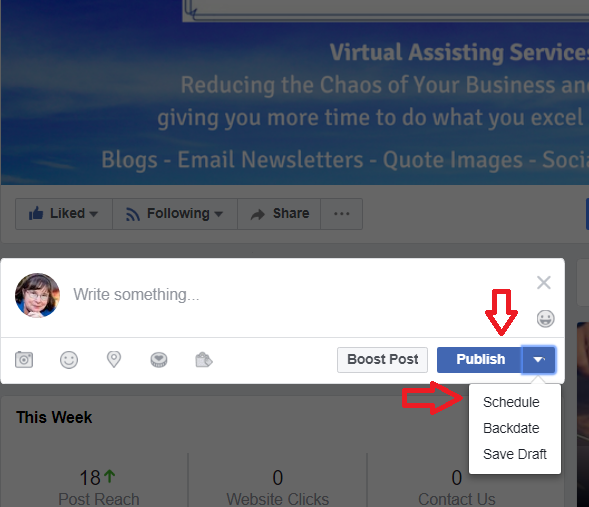
Create the post as you normally would, including images, but instead of clicking on the publish button, choose the drop down and select “Schedule” See Image #4 below. Once you click on the schedule button a calendar and time menu will appear and you can choose a date and time, then click on the “schedule” button at the bottom of that menu.

Image #4

You will usually be scheduling for a time in the future or use the publish feature. Once you have scheduled a post, you will need to refresh your page to see it in the line up in the scheduled posts area.

There is also a backdate feature and a feature to save a post as a draft if you aren’t ready to schedule the post.

Wondering how to find the scheduled posts on your page once you schedule them?

On your business page, right under the place you would create a post, you will see a box with the number of posts scheduled, this is where you can access the scheduled posts area. Click on the see post(s) link. Image #5 has an example of what this might look like on a page.

Image #5

Sharing from your Business Page, Profile or another Business Page:

Sharing someone’s content is great way to get more visibility, improve your social media connections and another way to get interesting content on your page. As you scroll through the newsfeed, or visit a page, you might come across something you want to share with your friends and followers.

How to share posts on Facebook:

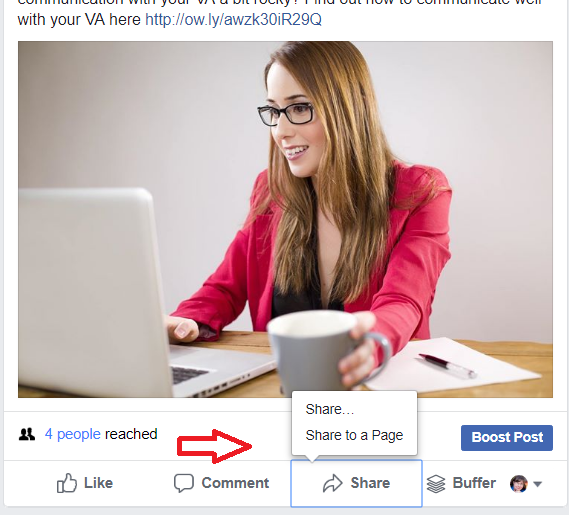
Step 1: Go to the post you want to share, then click on the “Share” option on that post – see Step #1 image below

Sharing Step 1

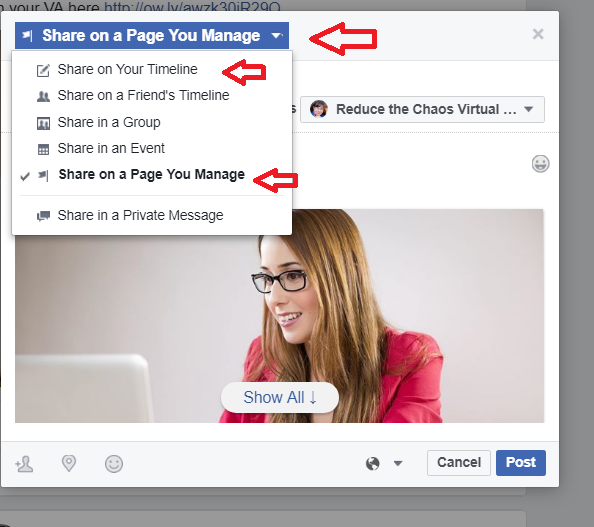
Step 2: Choose where you want to share the post. You will see a menu that has a blue bar that will say “Share on Your Timeline” or as shown in the image below “Share on a Page You Manage”. Note: the dropdown menu triangle and the choices shown on that menu in the image below. Click on you choice where of page or group where you want the post to appear.

(Note: you can always click on cancel if you change your mind about sharing the post)

Sharing Step 2

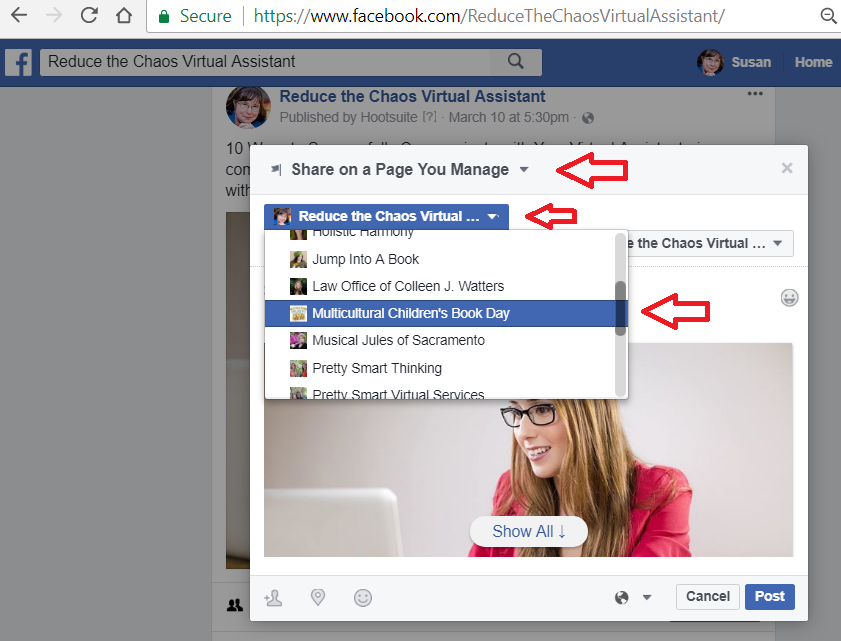
Step 3: Once you choose where you want to share the post, another menu will pop up if you manage more than one Facebook page. There is a scroll bar you can use to scroll through the pages until you find the one you need. Click on the page you want to share to. (If you aren’t a manger of a page, you won’t find that page on your list)

Sharing Step 3

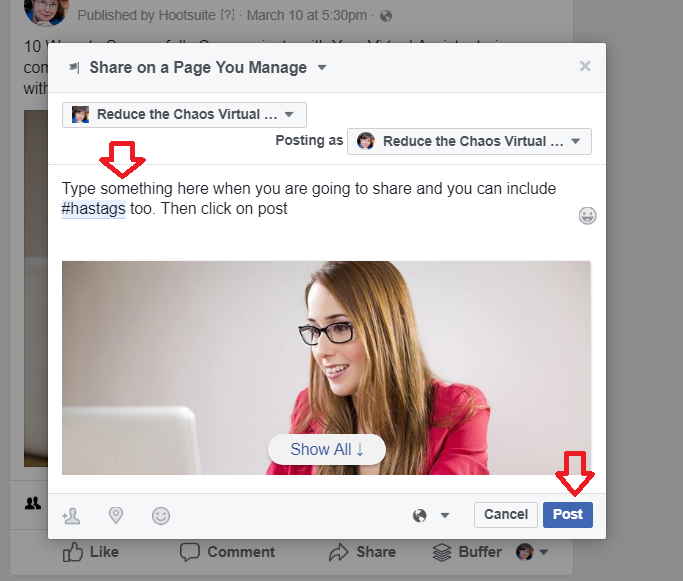
Step 4: The post window will open up and this is your opportunity to add some wording to the share (recommended that you do), add appropriate hashtags or emojis in the status area. Double check that the correct page or location is showing above the status area. Once you have added your comments, click the post button or if you change your mind, the cancel button.

Sharing Step 4

That’s it! You have shared a post and will be able to see it on that page or profile. If you don’t see the shared post, you might need to click on refresh for it to be visible.

If you get a message saying you can’t share a post, that is because the person or page has privacy setting set so you won’t be able to share that post.

Now you know more about:

  • Why you need a business page
  • Privacy Settings and post visibility
  • Using hashtags
  • How to edit a post
  • How to delet a post
  • Scheduling a post on a business page
  • Sharing a post from a page/to a page

Mastering social media can be done with a little time and effort. We hope you find these tips and “how to’s” helpful. There are many more features and tips for using Facebook and will dive into those on another blog post.

For more social media information or assistance visit Reduce the Chaos


Posted in Business, Social Media | Tagged , , | Leave a comment